Choose Your Games









On this page
- Where the Area 51 UFO Easter egg starts
- Step 1: Turn all eight tower lights green
- Step 2: Open the tunnel door near Objective F
- Step 3: Read the monitors to get your tower order
- Step 4: Press the towers in order to call the UFO
- Area 51 UFO Easter egg reward
- Battlefield 6 Season 5 services
- Frequently asked questions
- Sources and update history
To solve the Battlefield 6 Area 51 UFO Easter egg, turn the buttons at all eight numbered radio towers green, open the new tunnel door under the middle of the map, then read the control-room monitors to get a tower order that changes between matches. Press the towers in that order and a UFO appears, unlocking a secret challenge and a UFO weapon charm.
Players cracked the Easter egg on October 14, 2026, a day after Season 5 added the Area 51 map. EA has not acknowledged it officially, so everything below is community-sourced. For the map itself, see our Area 51 and Vegas Strip map guide.
Where the Area 51 UFO Easter egg starts
The steps in this guide come from community testing, not from EA. They were worked out by the Battlefield Easter Eggs Discord community and summarized by MP1st on October 14. We checked each step against the full walkthrough in Incredilags’ October 15 video guide.
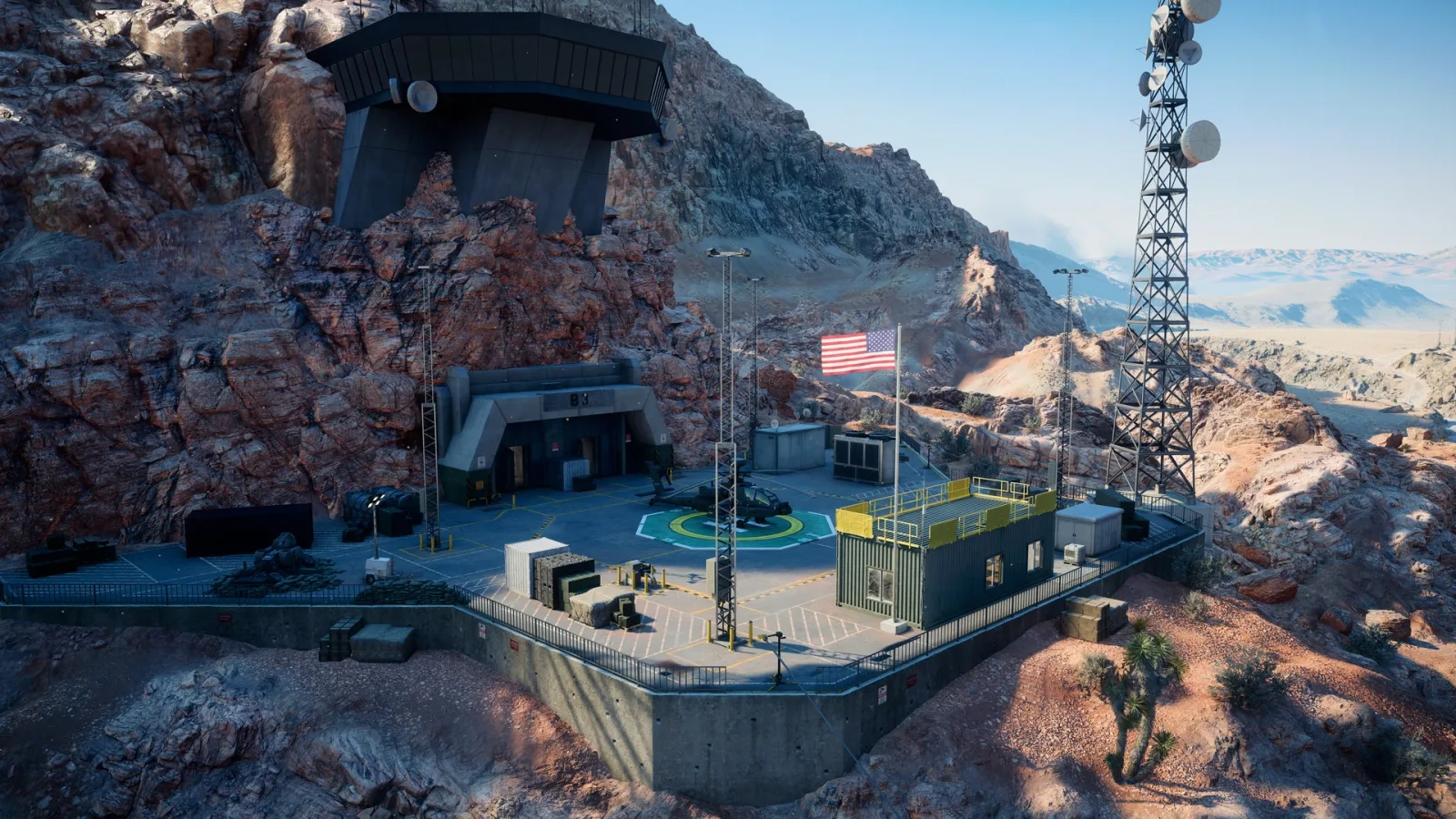
The puzzle uses eight radio towers spread across Area 51. Each tower has its number painted on the side and a button with a colored light. In the video walkthrough, towers 1 and 2 are the only ones whose buttons are not on the tower itself, so look around the base of those two.
The video recommends two to four players. It can be done solo, but the creator says it takes a long time because of the running between towers.
EA’s developer map guide describes Area 51 as a surface battle over a dry lakebed with an exposed underground facility of tunnels and labs beneath it. The towers are on the surface; the door you need is underground.
Step 1: Turn all eight tower lights green
- Visit all eight towers first and write down each button’s color. Buttons are green, yellow or red, and the starting colors change from match to match. Do not press anything yet.
- Enter the colors into the solver. In the community solver’s rules, each press moves a light one step from red to yellow to green and back to red, and changes the pressed tower plus the towers on either side, with towers 8 and 1 counted as neighbors. That matches the neighbor rule in the video. The free 8-Button Puzzle Solver, a community tool credited to the Battlefield Easter Eggs group, is built on those rules: click each of its eight buttons until it matches your tower colors, then press “Find Shortest Solution.”
- Press the towers in the order it gives you. The solver labels the buttons B1 to B8, and the Steam community guide that links it says to enter each color by tower number, so B1 is tower 1 and so on. If the tool says a setup is unsolvable, recheck the colors you wrote down before pressing anything.
- Check that all eight towers are green.
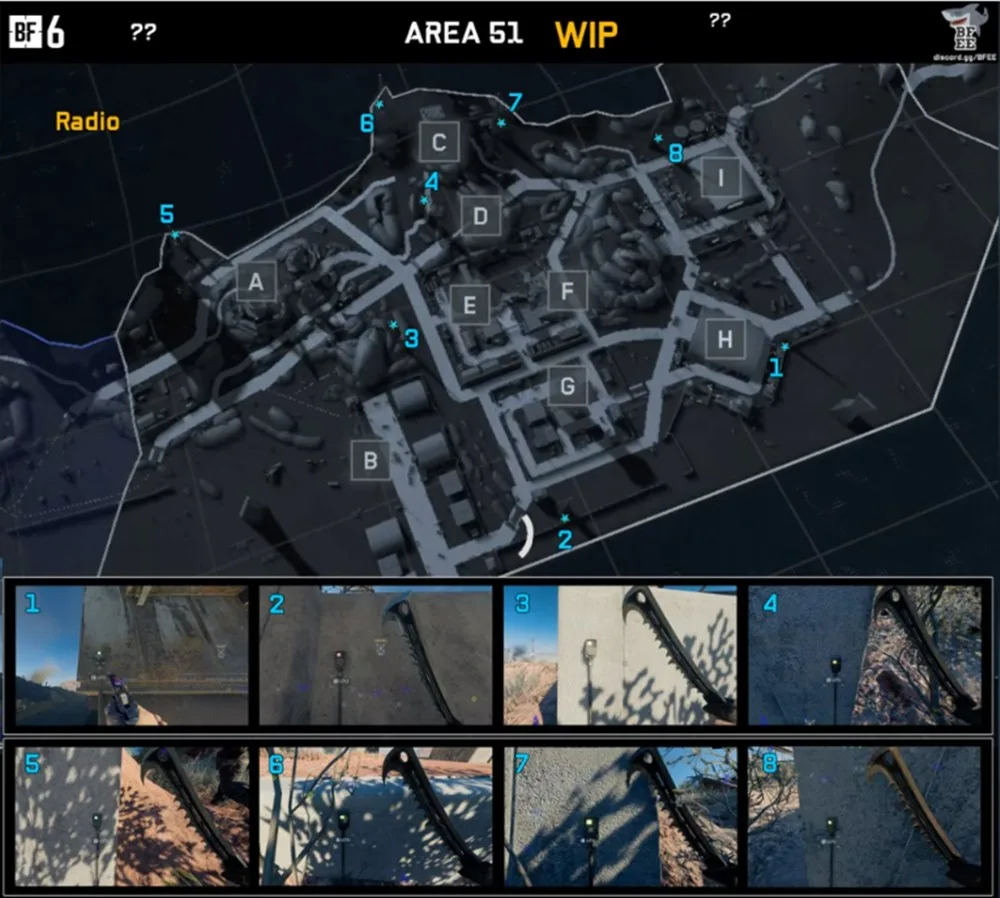
On that community map, tower 1 sits by Objective H, tower 2 south of the base near B and G, tower 3 between A and E, tower 4 between C and D, tower 5 on the western edge past A, towers 6 and 7 on the northern edge near C, and tower 8 near I. The map is labeled work in progress, so if a tower is not where it shows, check the number painted on the tower.
Step 2: Open the tunnel door near Objective F
When all eight lights are green, a new door in the tunnels under the middle of the map unlocks. MP1st places it near Objective F. You know you have done Step 1 correctly if the button to the left of the door has also turned green.
- Interact with the button to open the door.
- Follow the stairs and the long tunnel behind it to a control room full of monitors.
- Press the button at the front of the room. It plays Morse code and switches on every screen in the room.
You do not need to decode the Morse code. The video creator says it spells out “intruders underground” and plays no part in any step.
Step 3: Read the monitors to get your tower order
The control room gives you a second code: the order in which to press the tower buttons. That order changes between matches, so read it in your own match rather than reusing a sequence from a guide or video.
- The big monitors at the front always show the same eight shapes in the same order: empty circle, empty triangle, empty square, empty diamond, filled circle, filled triangle, filled square, filled diamond.
- The small monitors around the room each show one of those shapes with a row of white lights above it. The number of lights is a tower number. Eight lights above the empty circle means tower 8 is your first press.
Number eight sequence slots on paper, one for each shape on the big monitor. Go around the room, find the small monitor for each shape in that order, and write its tower number in the matching slot. The result is your press sequence. Some towers can appear twice and some not at all; the creator’s sequence started tower 1, tower 3, tower 8, tower 1.
Step 4: Press the towers in order to call the UFO
Go back to the surface and press the tower buttons in your sequence. During this step the buttons turn blue and do not change color when pressed, and the game gives no sign of whether you are right until the eighth press. Check your sequence before you start.
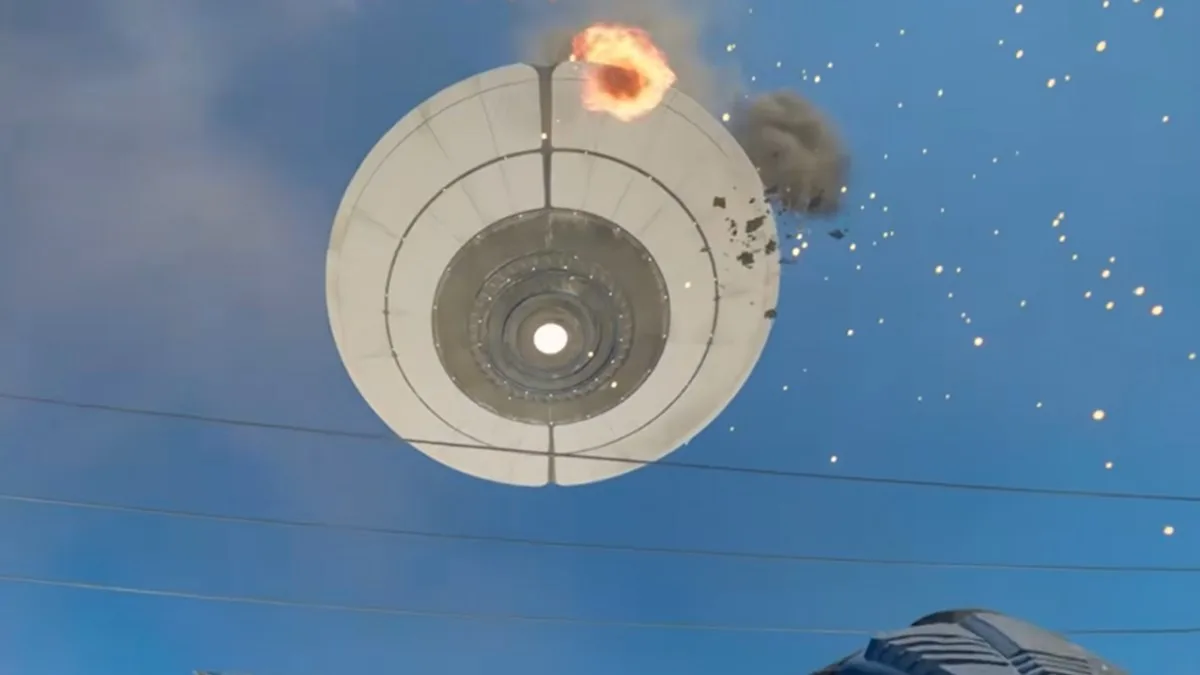
On the eighth correct press, a UFO flies over Area 51 in a short cutscene that every player in the match can see. It is shot down in the cutscene and crashes outside the map.
Area 51 UFO Easter egg reward
Finishing the sequence completes a secret challenge that gives XP and a UFO weapon charm, according to the video. Playnews.gg names the charm Base Invaders; that name comes from a single outlet, and EA has not listed the charm anywhere official. The amount of XP is not stated.
Battlefield 6 Season 5 services
If you would rather spend Season 5 on Easter eggs than on the level and weapon grind, these cover the rest:
 BF6 Multiplayer Bot LobbyA Battlefield 6 bot lobby for Season 5 XP and weapon progress.From $9.90View offer
 BF6 AssignmentsBattlefield 6 Assignments completed for you while you hunt Easter eggs.From $5.99View offer
Frequently asked questions
Is the Area 51 UFO Easter egg official?
It is in the game, but EA has not acknowledged it. All step-by-step details come from the community.
What do you get for the Battlefield 6 UFO Easter egg?
A secret challenge with XP and a UFO weapon charm. Playnews.gg names the charm Base Invaders; EA has not confirmed the name.
Can I reuse a UFO tower sequence from a video?
No. The eight shapes on the big monitors stay the same, but the tower numbers on the small monitors change between matches, so read them in your own match.
Can you do the Area 51 Easter egg solo?
Yes, but the video guide recommends two to four players because it takes a long time alone.
Why are the tower buttons blue?
Blue means you are on the final step. The buttons stay blue while you enter the sequence, and nothing confirms it until the eighth press.
Sources and update history
- MP1st: Battlefield 6 Area 51 Map Has a UFO Easter Egg and There’s Even a Reward Tied to Finding It, October 14, 2026 (eight towers, Objective F door, radio, fixed symbol order, charm reward; credits the Battlefield Easter Eggs Discord, BF Bulletin and DANNYonPC)
- Incredilags (YouTube): Area 51 Easter Egg Guide – Battlefield 6 Area 51 UFO Easter Egg Guide & Secret Challenge Rewards, October 15, 2026 (full walkthrough: button colors and neighbor flips, door button, Morse code, small-monitor light counts, blue buttons, UFO cutscene, XP and charm; tower map from the Battlefield Easter Eggs Discord)
- 8-Button Puzzle Solver (community tool, credited to BFEE in a Steam community guide): jzee001.github.io/Area-51-Button-Solver, checked October 18, 2026 (red-yellow-green cycle, neighbor rule with towers 8 and 1 adjacent, shortest-press solver)
- Playnews.gg: UFO easter egg Battlefield 6: how to unlock the Area 51 weapon charm, October 2026 (Base Invaders name)
- EA: Battlefield developer map guide: Vegas Strip and Area 51, October 2026 (map layout and underground facility)
Update history: Published October 18, 2026. Facts last checked October 18, 2026 against the sources above.